
Creating a Custom Status Line for Claude Code
How to build a custom Claude Code status line, wire it into settings, and display your own live session metadata at the bottom of the UI.
Claude Code supports a custom status line at the bottom of the interface, similar to a shell prompt. If you want to show things like the current model, token usage, API cost, or your own derived metrics, you can generate that line yourself with a small script.
The result can be as minimal or as opinionated as you want. In my case, I used it to surface environmental impact and a small personal signature directly in the Claude UI.
Claude Code documents two supported ways to set this up:
- Run
/statuslineand let Claude scaffold it for you - Add a
statusLinecommand manually in.claude/settings.json
The official docs for the feature are here: Status line configuration.
The exact script used in this post is also available on GitHub: FrankIglesias/claude-statusline-co2.
Prerequisites
Before setting this up, make sure you have:
- Claude Code installed and running locally
- Access to your Claude Code config directory at
~/.claude/ - A
~/.claude/settings.jsonfile, or permission to create one python3available on yourPATH, since this script parses JSON and computes the monthly metrics with Python- Existing Claude transcript files under
~/.claude/projects/if you want the CO2 and tree projection numbers to show real data
If ~/.claude/projects/ is empty, the script still works, but the environmental metrics will only become meaningful after you have some Claude usage history saved there.
How the status line works
Claude Code runs your configured command whenever the conversation updates. Your script receives JSON on stdin with contextual data about the current session, and the first line written to stdout becomes the rendered status line.
That JSON includes fields such as:
model.display_nameworkspace.current_dirworkspace.project_dirversioncost.total_cost_usdcost.total_duration_mscost.total_lines_addedcost.total_lines_removed
ANSI color codes are supported, so you can style the output exactly like a terminal prompt.
Option 1: Use /statusline
This is the fastest path.
Inside Claude Code, run:
/statuslineClaude will help generate the script and settings for you. If you already know what you want, be explicit:
/statusline show the model name, current folder, git branch, and total cost in orange and grayThis is the best option if you want Claude to bootstrap the files for you.
Option 2: Configure it manually
If you want full control, add a statusLine entry to .claude/settings.json:
{
  "statusLine": {
    "type": "command",
    "command": "~/.claude/statusline.sh",
    "padding": 0
  }
}
padding: 0 is optional, but it helps if you want the line to run edge-to-edge.
Step 1: Create the script
Create ~/.claude/statusline.sh:
#!/bin/bash

input=$(cat)

MODEL=$(echo "$input" | python3 -c "
import sys,json
d=json.load(sys.stdin)
m=d.get('model','')
if isinstance(m, dict):
    print(m.get('display_name', m.get('id', 'unknown')))
else:
    print(m or 'unknown')
" 2>/dev/null || echo "unknown")

TOKENS=$(echo "$input" | python3 -c "
import sys,json
d=json.load(sys.stdin)
cw=d.get('context_window',{})
usage=cw.get('current_usage')
if isinstance(usage, dict):
    print(sum(usage.values()))
else:
    print('?')
" 2>/dev/null || echo "?")

CACHE=/tmp/claude_monthly_co2.txt
CACHE_TS=/tmp/claude_monthly_co2.ts
NOW=$(date +%s)
LAST=$(cat "$CACHE_TS" 2>/dev/null || echo 0)

if [ $((NOW - LAST)) -gt 300 ] || [ ! -f "$CACHE" ]; then
  python3 - << 'EOF' > "$CACHE" 2>/dev/null
import json, glob
from datetime import datetime

month = datetime.now().strftime("%Y-%m")
total = 0
for f in glob.glob("/Users/francisco/.claude/projects/**/*.jsonl", recursive=True):
    try:
        with open(f) as fh:
            for line in fh:
                d = json.loads(line)
                msg = d.get("message", {})
                usage = msg.get("usage", {})
                if not usage:
                    continue
                ts = d.get("timestamp") or msg.get("timestamp")
                if ts:
                    try:
                        dt = datetime.fromisoformat(str(ts).replace("Z","+00:00")) if isinstance(ts,str) else datetime.fromtimestamp(ts/1000)
                        if dt.strftime("%Y-%m") != month:
                            continue
                    except:
                        continue
                total += sum(usage.get(k,0) for k in ("input_tokens","output_tokens","cache_read_input_tokens","cache_creation_input_tokens"))
    except:
        pass

co2_kg = total * 3.9 / 1_000_000_000
day = datetime.now().day
daily_avg = co2_kg / day if day > 0 else co2_kg
projected_kg = daily_avg * 30
trees = (projected_kg * 12) / 21
print(f"{co2_kg:.4f}kg|{trees:.1f}")
EOF
  echo "$NOW" > "$CACHE_TS"
fi

MONTHLY_CO2=$(cat "$CACHE" 2>/dev/null || echo "?|?")
CO2=$(echo "$MONTHLY_CO2" | cut -d'|' -f1)
TREES=$(echo "$MONTHLY_CO2" | cut -d'|' -f2)

echo "🌱 CO₂ emitted: $CO2 | 🌳 $TREES trees projected for this month"
This version is closer to what I actually run. It does a few specific things:
- Reads Claude Code’s JSON payload from
stdin - Extracts the active model and current context-window token usage with Python
- Scans Claude transcript JSONL files under
~/.claude/projects/ - Aggregates monthly token usage and converts it into an approximate CO2 value
- Projects a rough tree-equivalent number for the month
- Caches that expensive calculation for five minutes
- Prints a single line to
stdout
That last point matters: Claude Code only uses the first line of stdout as the status line.
Step 2: Make it executable
chmod +x ~/.claude/statusline.shIf the script is not executable, Claude Code will not be able to run it.
Step 3: Test the script outside Claude
Before debugging this inside the app, test it with mock input:
echo '{
  "model": { "display_name": "Sonnet 4.6" },
  "context_window": {
    "current_usage": {
      "input_tokens": 1200,
      "output_tokens": 450
    }
  }
}' | ~/.claude/statusline.sh
This should print a single formatted line. If it does not, fix the script first before blaming the Claude Code config.
Step 4: Restart or refresh Claude Code
Once the config and script are in place, Claude Code should start rendering the custom line at the bottom of the interface. If it does not appear:
- Verify
.claude/settings.jsonis valid JSON - Verify the script path is correct
- Verify the script writes to
stdout, notstderr - Verify
python3is installed and available on yourPATH - Verify the script prints exactly one useful first line
The docs note that only the first line of stdout is used, so do not leave debug logging in the script.
A more personalized version
Once the basic version works, you can start layering in your own data. In my case, I chose environmental metrics computed from Claude transcript usage. Other good options:
- Project-relative path instead of the full directory
- Git branch and dirty state
- Current Claude model in a specific color
- Session cost or duration
- Company or client name
- A right-aligned signature
- Personal metrics derived from your own workflow logs
The key is to keep it short. A status line is glanceable UI, not a dashboard.
What Claude passes into the script
The most useful implementation detail is that Claude Code already gives you structured session data. You do not need to scrape the terminal or infer state from the UI.
Here is a simplified example of the JSON shape from the docs:
{
  "hook_event_name": "Status",
  "cwd": "/current/working/directory",
  "model": {
    "id": "claude-opus-4-1",
    "display_name": "Opus"
  },
  "workspace": {
    "current_dir": "/current/working/directory",
    "project_dir": "/original/project/directory"
  },
  "version": "1.0.80",
  "cost": {
    "total_cost_usd": 0.01234,
    "total_duration_ms": 45000,
    "total_lines_added": 156,
    "total_lines_removed": 23
  }
}
That makes the customization model straightforward: Claude provides the state, your script decides how to render it.
Final result
Here is what the finished setup looks like in Claude Code:
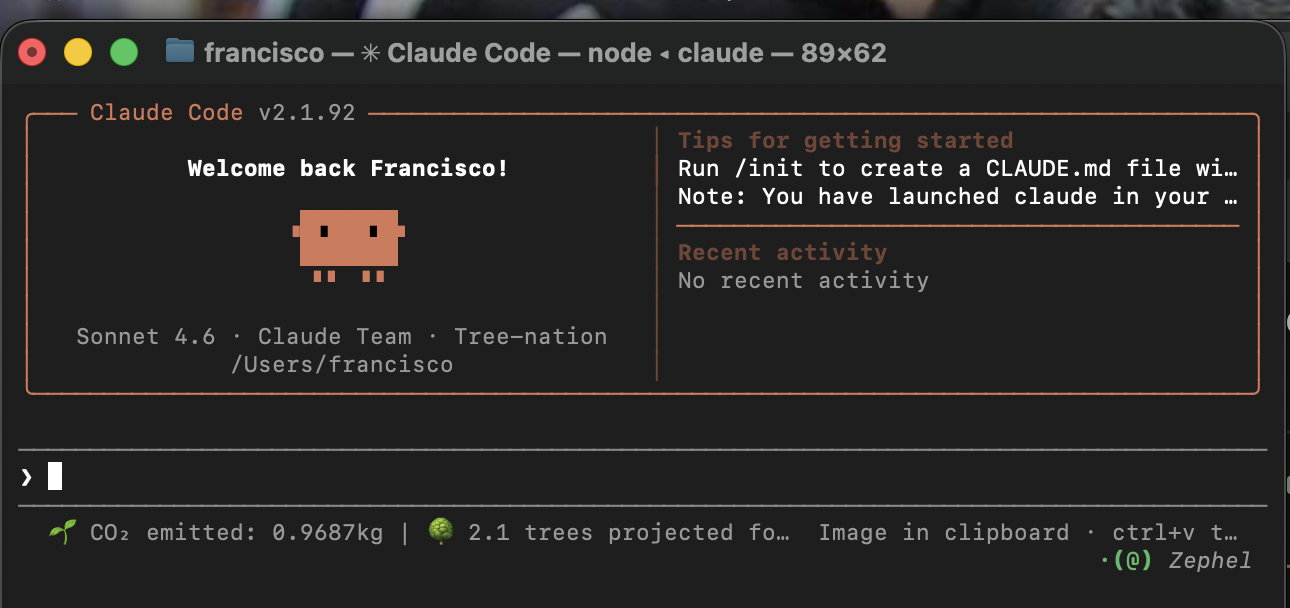
If you want the ready-to-use version instead of rebuilding it from the article, use the repo here: FrankIglesias/claude-statusline-co2.
That is the whole feature. Claude Code handles the plumbing. You only need a script that turns session JSON into one good line of text.