
How We Cut DOM Nodes by 94% with Frontend Virtualization
A content feed had 2.2 million DOM nodes and 1.3 million event listeners. Here's how we diagnosed it, why the masonry grid had to go first, what happened after we shipped, and what the numbers looked like at the end.
Two million DOM nodes. 1.3 million event listeners. 667 MB of JS heap. CPU pegged at 27%.
That was a content feed we were building — cards with images, videos, progress indicators, and action buttons. The feature worked. It just happened to be melting browsers in the process.
Here’s how we fixed it.
The problem
The feed renders a list of cards — each one has an image, a video, a progress bar, metadata, action buttons. When the list is short, this is fine. When it grows to hundreds of items, the browser is holding all of them in the DOM simultaneously, with every image loaded, every event listener attached, every animation running.
Chrome’s Performance Monitor made it concrete:
- JS heap: 667 MB
- DOM Nodes: 2,204,731
- JS event listeners: 1,331,140
- CPU: 27.8%
The backend was fast. The API returned in milliseconds. The problem was entirely on the frontend — every card that had ever loaded was still alive in the DOM.
The spike: four options
Before writing any code, we ran a spike to understand the options. We benchmarked production at 65 items and a virtualization prototype at 10 items:
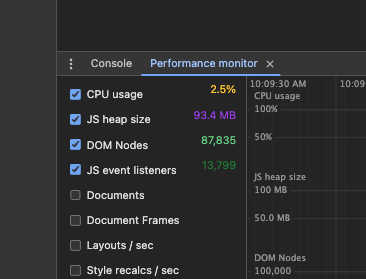
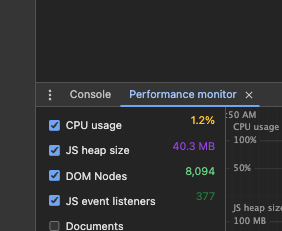
Even at 10 items, the virtualized version was already faster than production at 65. DOM nodes dropped from 87,835 to 8,094. JS heap went from 93.4 MB to 40.3 MB.
The spike evaluated four paths:
| Option | Description |
|---|---|
| 1 | Do nothing |
| 2 | Single-column layout + virtualization (existing rough design) |
| 3 | Virtualization on mobile only |
| 4 | Full new feed design + virtualization on mobile and desktop |
We chose option 4.
Not because we always pick the hardest one — but because the masonry grid was the actual blocker, and fixing performance without redesigning the layout wasn’t a real option.
The prerequisite: drop the masonry grid
The original feed used a 3-column masonry layout. Masonry requires knowing each item’s height before positioning it — the layout engine has to place items one by one, calculating vertical offsets based on which column is shortest.
Virtualization works the opposite way. A virtualizer needs to know, given a scroll position, exactly which items should be visible. To do that, it needs to predict the height of items it hasn’t rendered yet. Masonry makes that impossible.
The 3-column grid had to go. We replaced it with a single-column feed — the kind you’d recognize from any social app. This wasn’t just a visual change; it was the architectural prerequisite that made virtualization tractable.
The layout change meant coordinating with design on card sizes, placement of contextual cards, and overall spacing. It was a genuine redesign, not a shortcut.
Simplifying the card
Virtualization reduces how many cards are in the DOM at once, but we also looked at what each individual card was costing.
A few specific things were driving up the per-card cost:
Bootstrap listeners. Several card elements used Bootstrap’s JS-driven components (dropdowns, tooltips, modals) which attach event listeners on mount. With hundreds of cards rendered, these added up to thousands of listeners that were never being used. Removing or replacing them with simpler alternatives brought the listener count down significantly.
Unnecessary CSS animations. Some card elements had transitions and animations running continuously — even when the card was off-screen or idle. We stripped the ones that weren’t adding real value. CSS animations that run on every painted element aren’t free, especially when the browser is already managing a long list.
v-show → v-if. Parts of the card used v-show to conditionally hide content — which keeps the element in the DOM with display: none. Switching to v-if means those elements aren’t created at all when the condition is false, reducing both DOM nodes and any listeners attached to those subtrees.
Multiply each of these by the number of visible cards and the savings compound quickly. Virtualization and card simplification work together: virtualization controls how many cards exist, card simplification controls what each one costs.
Implementing virtualization with vue-virtual-scroller
With the single-column layout in place, we used vue-virtual-scroller (^2.0.0-beta.8) to virtualize the list.
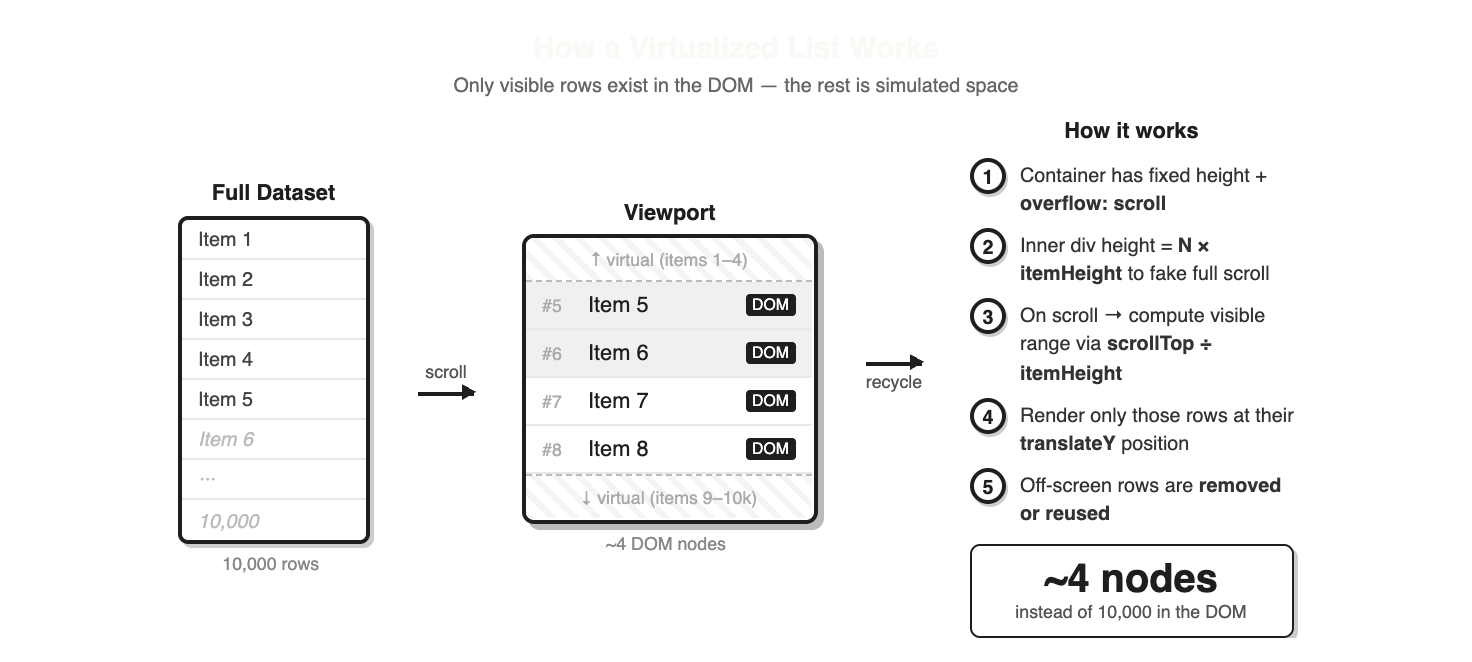
The core idea: instead of rendering 500 cards, the virtualizer renders only the ~10 that fit in the viewport, plus a small buffer above and below. As the user scrolls, items leaving the viewport are unmounted and items entering are mounted. The scroll container maintains the correct total height via a spacer, so the scrollbar behaves as if everything is rendered.
We used DynamicScroller rather than RecycleScroller. The difference matters: RecycleScroller requires fixed item heights, while DynamicScroller measures each item after it renders and adjusts the layout. Since cards vary in height (different image ratios, optional video, varying text), DynamicScroller was the right call.
<DynamicScroller
  :items="itemList"
  class="d-flex flex-column col-lg-6 feed-list"
  :min-item-size="230"
  page-mode
>
  <template #default="{ item, index, active }">
    <DynamicScrollerItem
      :active="active"
      :data-index="index"
      :item="item"
    >
      <!-- item content here -->
    </DynamicScrollerItem>
  </template>
</DynamicScroller>
Heterogeneous items
The feed doesn’t just contain content cards — it also has contextual cards interleaved at specific positions: a stats card at the top, a weather card early in the list, sponsor cards recurring every few items.
The approach was to build a single normalized array where non-content cards are injected as fake entries with sentinel IDs:
// special cards injected into the items array
{ id: 'header-card', ... }
{ id: 'promo-card', ... }
{ id: 'banner-card', ... }
Inside the scroller template, v-if chains on item.id route each entry to the right component:
<div v-if="item.id === 'header-card'">
  <header-card />
</div>
<div v-else-if="item.id === 'promo-card'">
  <promo-card />
</div>
<div v-else-if="item.id === 'banner-card'">
  <banner-card />
</div>
<div v-else>
  <content-card :item="item" />
</div>
This keeps the virtualizer’s API simple — it only ever sees one flat list — while letting the template handle the mixed rendering. The interleaving logic lives entirely in the computed property that builds the items array.
The bugs that followed
Virtualization introduces a class of bugs you don’t get with naïve rendering. We hit the canonical ones.
Stale images on scroll
The most visible bug: a card for item 2 would briefly flash item 1’s image before updating. This is the DOM recycling problem. When a virtual node is reused for a new item, the old item’s image is still there until the new one loads. If your component doesn’t reset its state on item change, you get a flicker.
The fix is to make sure the component either resets loading state when its item prop changes, or — more reliably — to set a key on the scroller item that forces a full remount instead of a patch.
This bug also surfaced a secondary issue: copying an item’s share link and pasting it in a new tab opened the wrong item. The two bugs had the same root cause — item identity wasn’t being tracked correctly through the virtual layer.
Page reload on mobile scroll
On mobile, scrolling down would cause the entire page to reload and snap back to the top. This one took some investigation.
The virtualizer and the infinite scroll mechanism both manage scroll position. When they conflict — each trying to respond to the same scroll event — the result can be a full navigation trigger on mobile browsers. The fix was untangling the scroll event ownership so only one system was responding at a time.
Layout regressions
After the layout restructure, some spacing was off on mobile — padding values that had been fine with the old grid were now wrong with the new single-column layout.
This kind of regression is predictable when a large architectural change touches layout primitives. Worth budgeting time for it.
Post-launch polish: prefetching
After the initial launch, users noticed a “stop and go” effect while scrolling. Skeleton placeholders were briefly visible before each card loaded.
This is the classic virtualization trade-off: you save memory by not rendering off-screen items, but you also lose the pre-loaded images that would have been there with full rendering. The browser no longer has a head start on images just below the viewport.
The fix was to prefetch data further ahead of the scroll position — requesting the next batch from the backend before the user reaches it. By the time the virtualizer asks for those items, the images are already in the browser’s cache. The skeletons disappear.
The result
Chrome’s Task Manager tells the story at the tab level:

The same tab, the same page — 2.2 GB down to 1.3 GB. And Chrome DevTools showed the internal breakdown:
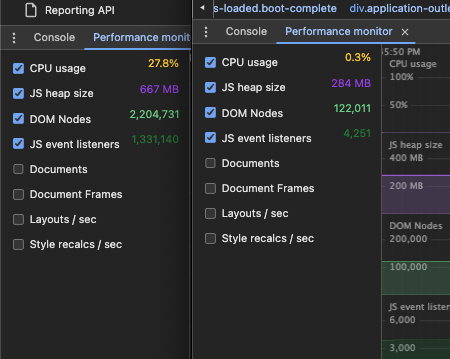
| Metric | Before | After | Change |
|---|---|---|---|
| Tab memory (Task Manager) | 2.2 GB | 1.3 GB | −41% |
| DOM Nodes | 2,204,731 | 122,011 | −94% |
| JS event listeners | 1,331,140 | 4,251 | −99.7% |
| JS heap | 667 MB | 284 MB | −57% |
| CPU usage | 27.8% | 0.3% | −99% |
The scroll is smooth. The tab doesn’t slow down the rest of the browser. The feature works the way it was supposed to.
What to take away
The layout is often the blocker. Masonry and virtualization are fundamentally incompatible. If you’re trying to virtualize a non-standard layout, you may need to change the layout first. That’s not a failure of the approach — it’s the prerequisite.
Plan for recycling bugs. Stale state in recycled nodes is the most common virtualization bug. Build in time to handle component key management and state reset on item change.
Virtualization trades memory for latency. The browser no longer has images preloaded. You need prefetching to keep the experience feeling instant. Tune your overscan and request window — too small and users see skeletons, too large and you’ve undone the memory savings.
Heterogeneous lists are solvable. Interleaving contextual cards into a virtualized feed looks complicated but it’s just a matter of normalizing your data model — one flat array where each entry has a type and the template routes to the right component.